
Even though COVID restrictions are loosening and employees are starting to return to office work, the benefits of video conferencing seem too attractive to pass up. Therefore, this method of business meetings will remain firmly incorporated into today’s work environment.
But there are no universal communication tools that will cover all the possible business tasks of companies across various industries. Cutting-edge technologies will continue to provide new opportunities for communication.
In this article, we will focus on using custom AR/VR software for video conferencing and explore how to leverage the technology to improve online collaboration
What Is Augmented Reality Video Conferencing
A conference or business meeting held online using the capabilities of Augmented Reality technology can be referred to as AR conferencing. The distinguishing feature of AR is that it doesn’t replace real images but simply adds new layers to the real world to enhance it.
With AR, companies can eliminate the effect of distance and improve collaboration by allowing attendees to interact with objects instead of passively watching slideshows. This brings distant employees together and engages and motivates them during an online meeting.
One more way to improve online communication is to organize virtual meetings using the capabilities of Virtual Reality. We covered this topic in detail in another article.
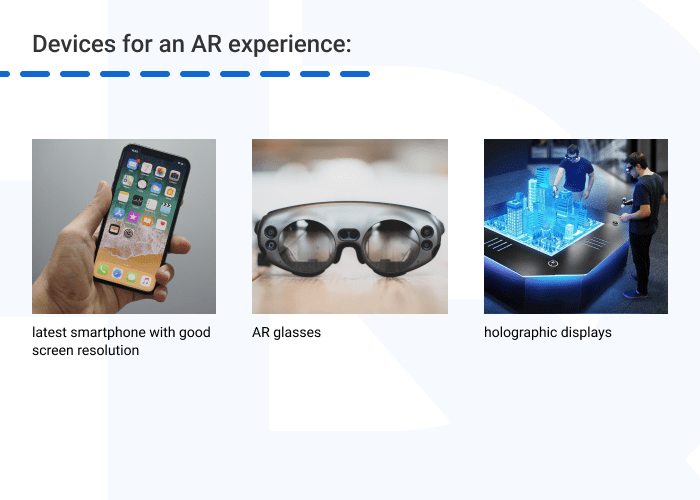
The use of AR during video conferencing in business is possible if employees have access to particular devices, including:
- any latest smartphone with good screen resolution;
- AR glasses;
- holographic displays.
In business communication, AR can be useful for:
- presenting ideas;
- visualizing objects and data;
- providing data in real-time;
- allowing holographic communication;
- troubleshooting;
- building formal relationships; etc.
In all of these cases, AR can be a great help, as the technology facilitates particular challenges businesses face when trying to communicate remotely.
Want to build an AR solution for conferencing ? We’re ready to help!Hymux Technologies has a team of skilled professionals ready to tackle the project. Let’s talk!
Anna Halias
Business Development Manager,
Hymux Technologies

Challenges to Conferencing
Though online meetings and conferences are nothing new and their use has skyrocketed in the past 3 years, there are still many challenges that businesses need to overcome to ensure effective communication:
- keeping employees’ attention during online meetings;
- creating an atmosphere of trust and free thought, as distance makes it hard to pick up non-verbal signals;
- providing the required technical capabilities for effective online communication;
- providing opportunities to build formal relationships, the lack of which may negatively impact team productivity;
- creating an atmosphere similar to offline meetings.
As practice shows, these obstacles can’t easily be overcome with traditional platforms for video conferencing.
Besides, recent trends show that 74% of companies have moved or plan to move to a hybrid work model, which poses additional struggles. Managers now have to combine offline and online meetings, with one part of the team in the office and the other working remotely.
In this case, the ability to visualize objects and provide equal capabilities for remote and semi-remote collaboration is more important than ever. And AR conferencing solutions are an excellent choice for these tasks.
Benefits of Using AR in Conferencing
Visualization
A quality picture is worth a thousand words, while а high-quality 3D model is worth a thousand pictures. With a 3D model, a speaker can demonstrate a product or object they’re speaking about from all angles and be more convincing. This technique can be used both for internal company meetings and meetings with potential clients.
The ability to test a product and interact with its 3D model enhances customer decision-making and provides an unforgettable experience. Moreover, a company can offer a personalized AR experience and show how a product helps to solve unique client challenges.
In addition, Augmented Reality video conferencing reduces travel costs for sales representatives or freight costs for transporting large products. Using AR, a client can see a 3D model in a full manufactured size at any location. A 3D model can also represent a scaled-down or enlarged product version, making it possible to explore an item in detail.
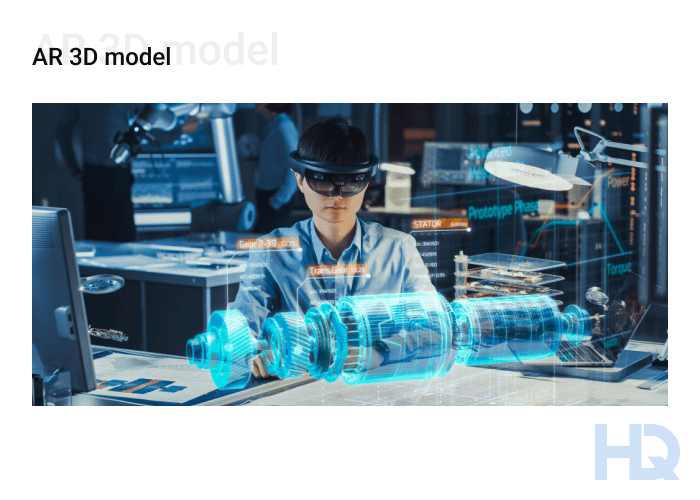
In the case of internal meetings, AR works the same way, allowing for comprehensive presentations, data visualization, prototyping, and product showcases. Even if other meeting members cannot interact with a real product, with AR a speaker can be sure that all attendees are on the same page.
Increased productivity
AR video conferencing apps provide many new capabilities for collaboration. For example, they enable brainstorming ideas and sharing and handling whiteboard ideas. Another option is to use virtual prototypes, reviewing and analyzing them, sharing the same models, to work together on issues, reduce chances of misunderstanding, and so on. Moreover, 49% of IT leaders believe the main advantage of AR for the workforce is the ability to access information in real-time, which improves work efficiency.
All of the above contribute to creating a comfortable space for collaboration and communication, resulting in more productive teamwork.
Better engagement
Thanks to AR masks, filters, virtual backgrounds, and other techniques that offer the ability to extend the real world, participants become more engaged and focused during meetings. AR elements also help to create a personalized video conferencing experience, to keep employee attention and increase their satisfaction.
In addition, the opportunity to interact with 3D objects immerses members in the meeting flow and reduces distractions from external stimuli.
Higher retention
Illustrated information, demonstrating materials in an engaging way, and frequent changes in the virtual elements boost the attention span of attendees, resulting in higher retention of information garnered in an AR video conference. AR helps participants better absorb information, immerse themselves in the discussion, understand tasks more easily, and be more productive during meetings.
How do modern businesses use AR to increase their revenues and outperform their industry competitors?
Freedom of expression
AR meeting apps ensure freedom of social expression through AR masks and avatars. This is especially important when it comes to webinars or other large-scale conferences, where people are not acquainted with each other. By using some fictional avatars or masks instead of appearing as themselves, attendees can cope with social anxiety, freely participate in discussions and bring their ideas to the table.
This effect can be called “safety in public”: people can express themselves and their thoughts, but in the safety of their own homes.Thus, companies can establish an innovative corporate culture, strengthen their image as a modern brand, and increase employee satisfaction.
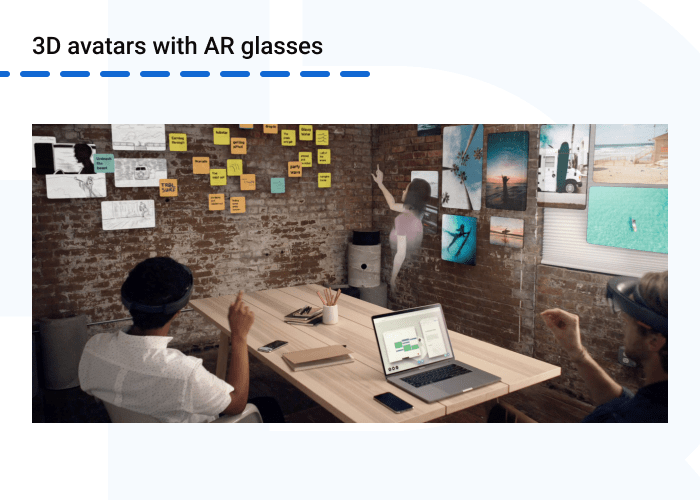
Another way AR video conferencing apps help make communication more comfortable is by creating 3D avatars that can join other meeting members in a specific physical room using AR glasses. This is useful for hybrid conferences and masks the physical absence of teammates. Speakers are able to make eye contact and feel more comfortable and focused during online communication.
How AR Is Changing the Future of Conferencing
Even though businesses are trying to return to offices, statistics show that 74% of employees are eager to continue working from home. This is increasingly pushing companies to adopt a hybrid working model. Moreover, businesses have already benefited greatly from dealing with specialists and clients all over the world. All these factors suggest that video conferencing solutions will be even more in demand in the future of business communication.
Although AR has already been used in video conferencing, its potential has yet to be fully revealed. The technology allows for going far beyond AR masks and filters, to changing the traditional understanding of business meetings.
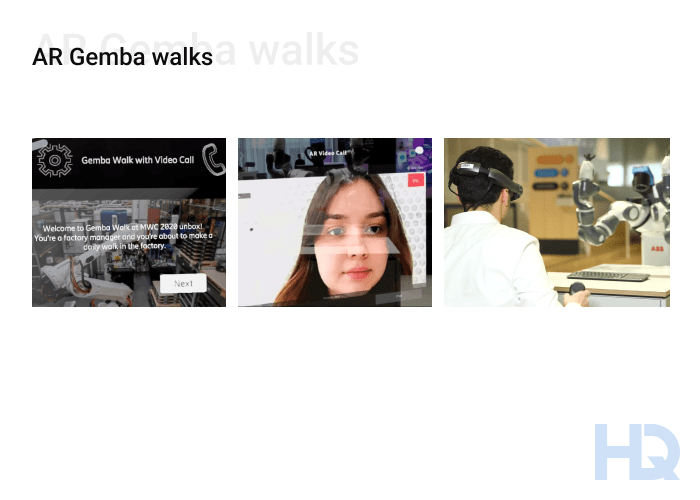
For example, Ericsson has introduced AR to take its Gemba walks — daily tours by factory managers to assess work progress and interact with employees — to the next level using Magic Leap AR glasses. In addition to getting real-time data on equipment efficiency and analytics during walks, managers can initiate audio or video calls on the go to discuss and share issues with other employees in an instant. This increases the efficiency of communication and speeds up task completion.
Another trend we can expect in the near future is improvements in equipment. Tech companies are upgrading AR devices, making them simpler and easier to use as well as cheaper and more accessible for businesses.
But while video conferencing tools are improving and trying to provide more features for collaboration, their capabilities are still not enough. So, companies face the necessity of creating custom AR video conferencing apps that meet all business needs.
How Hymux Technologies Can Help You Create AR Meeting Apps
To ensure a smooth AR experience, quality models, and seamless connection with surroundings, software experts need to have skills and experience in 3D modeling, texturing, animation, shader, and script writing. This is where Hymux Technologies’s AR specialists have strong skillsets gained from a variety of delivered projects.
For example, our team has built an AR platform for marketers and creatives that allows for creating immersive AR presentations. It can be used not only for marketing campaigns but also for pitches during meetings and conferences.
By partnering with Hymux Technologies, you will get an experienced team of on-demand specialists that will guide you through the creation of AR video conferencing software. Contact us to find out how we can help you implement AR technology to improve your video conferencing.
References
- Purdue University – An Examination of Social Presence in Video Conferencing vs. an Augmented Reality Conferencing Application https://docs.lib.purdue.edu/techmasters/15/
- MIT Press / PRESENCE Journal – The Shortcomings of Video Conferencing Technology, Methods for Revealing Them, and Emerging XR Solutions https://direct.mit.edu/pvar/article/doi/10.1162/pres_a_00398/117346/The-Shortcomings-of-Video-Conferencing-Technology
- Academia.edu – The Effect of Spatial Cues in Augmented Reality Video Conferencing https://www.academia.edu/74325882/The_effect_of_spatial_cues_in_augmented_reality_video_conferencing
AR/VR Expert
A developer with extensive expertise in AR/VR, very ingrained into the topic of Mixed Reality development. Shares his knowledge and the results of many years of work.


Related Posts
View All

Frequently Asked Questions
What Is AR in a Meeting?
What Problems Does AR Solve?
What Technologies Are Used for AR Apps?
How Do You Develop Augmented Reality Applications?
Is AR Costly?
In Which Industries Is AR for Video Conferencing Most Useful?
Can AR Be Integrated With Existing Video Conferencing Platforms (Zoom, Microsoft Teams, Google Meet)?
Are There Affordable AR Tools for Companies to Start With?
What Equipment Do I Need to Use AR in Video Conferences?
Do Participants Need AR Glasses, or Can They Join From Regular Devices?
We are open to seeing your business needs and determining the best solution. Complete this form, and receive a free personalized proposal from your dedicated manager.

Sergei Vardomatski
Founder