
Highlights
Need
Rapidly equip learners with essential VR interaction skills to facilitate next-level vocational training
Solution
Virtual simulation for mastering basic VR interaction techniques
2X
faster skill acquisition
3-week
prototyping
Quick Video About the Project
Results
The customer successfully implemented a VR simulation, developed by Hymux Technologies, to rapidly train newcomers in VR interaction techniques, such as body movements, pointing, selection, grabbing, manipulation, and environment interaction.
The simulation is carefully designed to last about 10 minutes. This duration strikes a balance between providing an engaging experience that effectively showcases the necessary skills and preventing cognitive overload, or learners’ fatigue.
To help users learn, we added voice-over instructions in both English and German. These instructions clearly guide users on what to do at each step. The customer is fully satisfied with the current simulation and is now collaborating with Hymux Technologies to develop the next-level simulation for ground staff training.
Looking for similar solutions or something unique to your needs?Contact us today! We’re happy to explore your needs!
Victoria Rokash
Business Development Manager

Customer
The customer is a German startup that specializes in producing customized virtual training simulations for airport employees. The company aimed to strengthen educational programs and shorten learning time by leveraging Virtual Reality.
Solution
The simulation is a comprehensive tutorial that covers the fundamental mechanics of interaction in VR. By immersing learners in realistic environments, the simulation aims to make them feel truly present and engaged in the learning process. The primary goal of this simulation is to equip newcomers with the necessary hands-on skills for effective interaction in VR, including:
- Pointing and selection to perform actions using gestures like pinching or swiping with controllers.
- Grabbing and manipulation to pick up, move, rotate, or scale virtual objects using controllers or hand-tracking systems.
- UI interaction to confirm selections with a simple button press or gesture on virtual menus, buttons, sliders, and other interface elements.
- Voice сommands to better issue instructions, navigate menus, or trigger actions. Works well for accessibility and multitasking.
- Environmental interaction to move through virtual spaces using physical walking and engage with dynamic elements, such as opening doors, climbing ladders, or interacting with non-player characters (NPCs).
Once learners complete this simulation, they will be able to navigate future simulations without needing extensive guidance.
Scenarios
To make the training more engaging, we created a series of scenarios that realistically depict the workday of an industrial building employee. We chose a neutral setting adaptable for training various roles. This location, however, also lends itself to simulating an airport environment, specifically for upcoming training sessions for airport personnel.
To address this, we have developed four distinct scenarios:
1. Introduction: Basic body movements training
A learner starts a workday. The initial surroundings include a utility room, elevator, and stairs. This module focuses on basic movement: turning your head, rotating your body, moving forward, backward, and sideways.
Upon successful completion, a learner will receive a confirmation message: “Yes, you’ve performed all actions correctly.”
2. Reception desk: Object manipulation training
The simulation begins as the learner climbs the stairs and enters a large reception hall, where a reception desk is the central feature. The primary learning objective at this stage is object manipulation. Learners learn to grab and interact with items through a series of tasks.
First, the learner encounters a potted flower and a spray bottle on the desk. The task is to water the flower; the learner has to pick up the bottle and use the spray action. Then, the learner is asked to collect essential workday tools: a notepad, badge, and walkie-talkie. They must learn to pick these items up and store them in their pocket (an inventory system implemented separately).
Emergency situation training
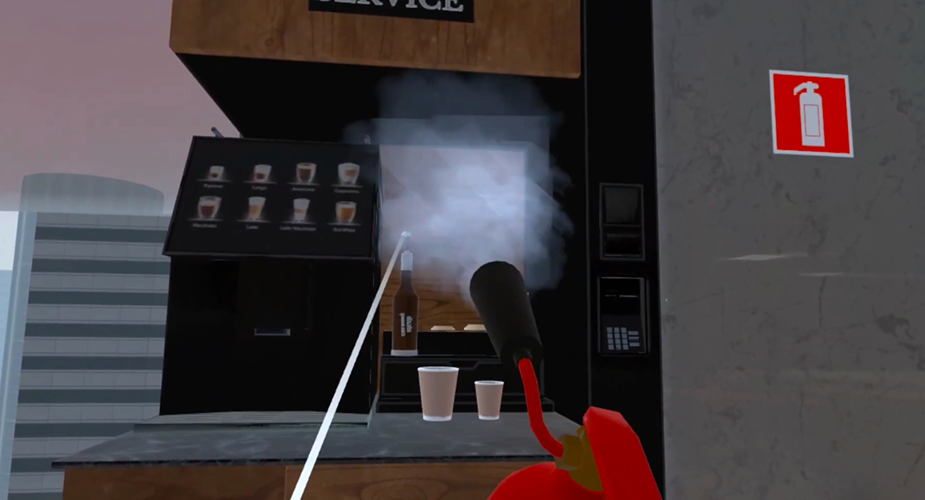
After completing the reception desk tasks, the scenario transitions to getting coffee. The learner picks up a glass and approaches the coffee machine. However, a sudden emergency interrupts this: the coffee machine malfunctions and begins to spark. This introduces a problem-solving element, where the user must locate a fire extinguisher and extinguish the fire to resolve the situation.
3. First aid response: UI interaction training
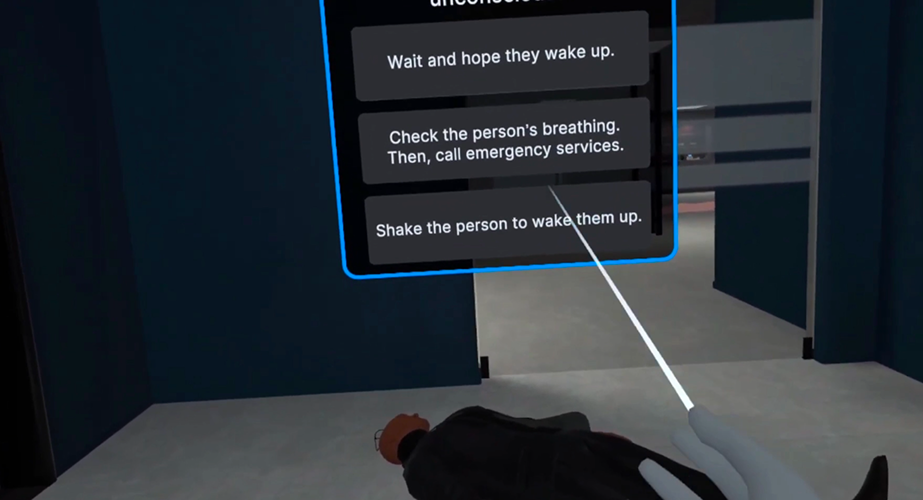
The objective here is to train users on essential first-aid responses by using virtual menus, buttons, sliders, and other interface elements. The simulation guides the learner to check whether an unconscious avatar is breathing and then make a simulated call to emergency services.
To test understanding, we incorporated a brief quiz that posed the question: “What are the immediate steps to take when encountering an unconscious person?” The learner can select from multiple possible answers.
After successfully first-aid response, the learner now continues with regular workday activities.
4. Fire alarm: Environmental interaction training
While walking down a hallway near the restrooms, the user notices smoke emanating from under a restroom door. They must react to this sign of potential fire. The scenario presents various choices, with different outcomes.
Incorrect options might include attempting to extinguish the fire directly, or ignoring the smoke and fleeing. The correct action is to activate the fire alarm. The learner must locate the alarm, break the glass with the provided hammer, and press the button to initiate the alarm. Following successful activation, the evacuation lights switch on, illuminating the safest exit routes. Now the simulation is over.
To support user learning, we’ve incorporated voice-over instructions that offer clear and helpful guidance on the actions required at each point in the experience, in both English and German. Each option emphasizes the benefits of the voice-over instructions while using more active and engaging language.
Challenges
When working on the project, our development team encountered several challenges:
1. Facing a time constraint, we solved the problem of simulating breathing checks on an unconscious avatar. Instead of complex animation, we implemented a snap zone near the nose. So, a timer appears when the learner interacts with the zone, ensuring a realistic interaction and avoiding immediate hand withdrawal.
2. While using pre-made assets offered some advantages, we found that optimization was often necessary. A 4-story building, for example, needed to be simplified to 4 rooms, leading to a reduction in polygon count. However, this optimization proved to be more extensive than required.
3. Creating convincing smoke and fire effects in VR often involves a compromise between visual realism and performance. We opted for a solution that utilizes flat planes with animated smoke textures, carefully optimizing their size and positioning to maintain visual fidelity while minimizing performance impact. This approach allows for a visually engaging experience without overwhelming the system.
Team
- 1 Project manager
- 1 Unity developer
- 1 QA engineer
- 1 Tech lead
We are open to seeing your business needs and determining the best solution. Complete this form, and receive a free personalized proposal from your dedicated manager.

Sergei Vardomatski
Founder