Table of contents:
Why Does LMS Feature Comparison Matter?
What Are the Key Features for Your LMS Comparison Checklist?
Partner With Hymux Technologies for an LMS

Choosing the right learning management system (LMS) is a pivotal decision for any organization looking to scale its training efforts. However, the market is packed with platforms all bragging about having endless features. It can be really hard to find the perfect fit for your needs.
Our 20+ years of experience have shown us a simple truth: the best LMS isn’t the one with the most features. It is the one that fits your unique business architecture. From seamless integrations to scalable cloud infrastructure, the technical nuances often determine long-term success.
In this guide, we’ll turn down the noise to make learning management system comparison easy, so you invest in a tool that trains your team and moves your business forward.
Why Does LMS Feature Comparison Matter?
What Are the Key Features for Your LMS Comparison Checklist?
Partner With Hymux Technologies for an LMS
Let’s start with a formal definition. An LMS is a digital platform, like a website or an app, used to host and deliver training programs or online courses. Simply put, it’s a digital classroom where everything is organized in one place:
However, if the learning platform is too complicated or missing key tools, your students or employees simply won’t use it. For example, a platform built for schools often lacks the specific tools needed for corporate sales training. Similarly, a system designed for compliance may miss the social features necessary for effective team collaboration.
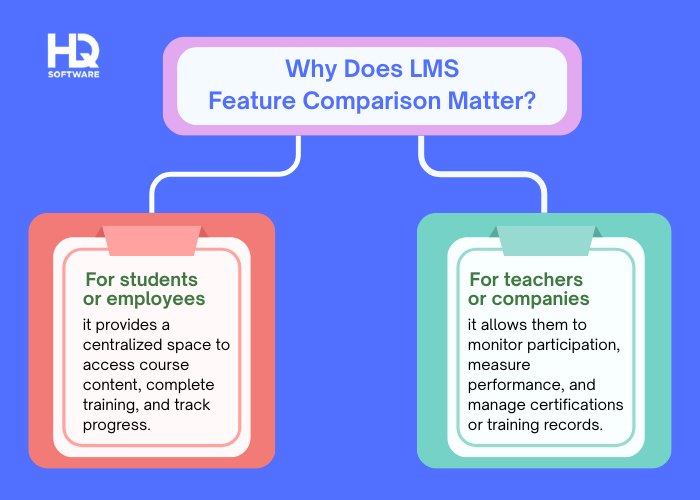
Comparing features helps you find a balance between a system that is powerful enough to handle your training and simple enough for everyone to enjoy.
Aligning LMS features with your team’s unique requirements makes training more intuitive and keeps employees motivated to grow. You may use the following LMS comparison checklist as a benchmark, to ensure the platforms you are comparing offer the tools your business needs to succeed.
The system should make it simple to upload and organize your lessons. Whether you have videos, documents, or interactive slides, you need a tool that lets you build and update your training materials quickly without needing to be a computer expert. Crucially, these tools should also allow you to manage users easily through bulk uploads and automated workflows.
For instance, you should be able to set rules that automatically enroll new hires in a specific “Onboarding” course and send email reminders if they fall behind. These automated workflows save your HR team hours of manual administrative work.
Want to see how custom LMS solutions perform in real-world scenarios?
Explore Hymux Technologies’s case studies to discover how we’ve helped companies design, build, and scale effective learning platforms.
You need to know if your training is actually working. Good reporting tools show exactly who has started a course, who finished it, and how well they scored on tests. Modern analytics go beyond simple “pass/fail” marks. They allow learners to see exactly where they are getting stuck. This helps to identify gaps in training materials and proves that the team is meeting its legal or professional learning goals.
Picture yourself noticing that 40% of your staff failed a quiz on “Cybersecurity.” By looking at the detailed analytics, you see that almost everyone got the same question wrong about phishing. This tells you that the current lesson on phishing isn’t clear enough, allowing you to update that specific part of the course to better protect your company.
Your business might grow in the future, so your LMS needs to be able to grow with it. Whether you have 50 employees or 5,000, the system should still run fast and work perfectly. This ensures you won’t have to switch to a new software system just because your team got bigger. It should also handle sudden increases in traffic without crashing or slowing down.
Imagine it is final exam week or the first day of course registration. Thousands of students are logging in at the exact same second to submit assignments or sign up for classes. A scalable LMS will automatically adjust its resources to handle this massive spike in traffic. This ensures the site doesn’t crash and students can complete their high-stakes work without being frustrated by technical problems.
The LMS should work well with the other tools your company already uses, such as HR software, calendar apps, or communication platforms such as Slack and Microsoft Teams. If the system can connect and share data with these tools automatically, it saves you a lot of time and reduces the risk of human error. This connectivity ensures that your learning platform becomes a seamless part of your daily digital workspace rather than a disconnected “island” of software.
To be more clear: when you integrate your LMS with your HR system, the two systems can talk to each other. When a new employee is hired and added to the HR system, their account is automatically created in the LMS. If they leave the company, their access is automatically removed. This means your admin team doesn’t have to spend any time manually managing accounts.
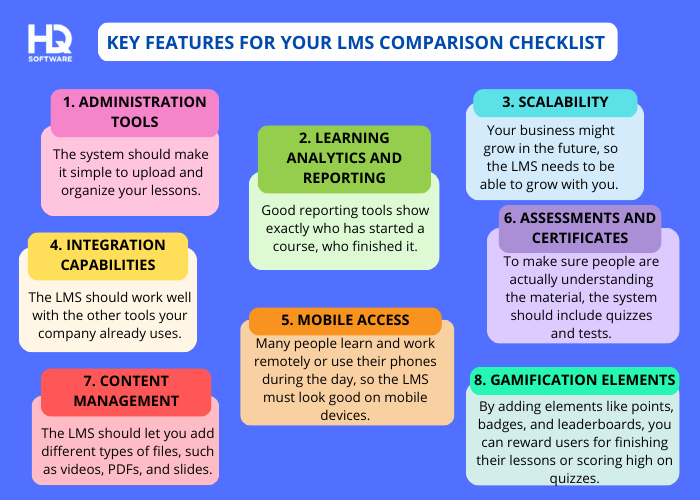
Many people learn and work remotely or access content on their phones, so the LMS must be mobile-friendly. Whether on a tablet or smartphone, users should be able to access lessons anytime, anywhere. This ensures learning continues even when they are away from their desks. Ideally, users should also be able to download content over Wi-Fi, so they can keep learning without an internet connection.
For example, a student commuting to campus on a train can use their smartphone to watch a recorded lecture or complete a practice quiz. Offline access allows students to download lessons on the university Wi-Fi and study during their commute, even without an internet connection. This ensures that learning happens whenever it fits into a student’s busy schedule.
To make sure people are actually understanding the material, the system should include quizzes and tests. Upon passing, it can automatically issue a certificate, which is especially important for companies that must verify completion of legal or safety training. Certificates can also be customizable with your company logo to maintain a professional appearance.
Additionally, features that track expiration dates are vital for recurring certifications. For instance, if a safety license expires in one year, the system can automatically alert the employee and their manager to retake the course, keeping everyone compliant with regulations.
You need a simple way to upload and organize your training materials. The LMS should let you add different types of files, such as videos, PDFs, and slides. A strong content management system also includes features like “drag-and-drop” course builders and the ability to update a single file across multiple courses at once. This makes it easy to keep your lessons up to date and interesting for your learners.
When your company updates its employee handbook, you can simply upload the new PDF to the central content library instead of manually searching for and deleting the old version from multiple training paths. The LMS automatically replaces the old version everywhere it is linked, ensuring that every employee (no matter which course they are taking) is always reading the most current information.
Gamification makes learning feel more like a game and less like a chore. By adding elements like points, badges, and leaderboards, you can reward users for finishing their lessons or scoring high on quizzes. This fosters friendly competition and motivates employees to stay engaged with their training so they can reach the next level or rank at the top of their team. You can also use these features to guide the learning path by locking advanced content until certain achievements are unlocked.
In a university language course, students could earn points for every vocabulary exercise they complete and a “Fluent Speaker” badge after passing their oral exam. To ensure students follow a logical progression, the professor could set the system to keep the “Advanced Literature” module locked until the student earns the “Intermediate Grammar” achievement. This turns the curriculum into a series of achievable levels, making the academic workload feel more like a rewarding journey than a list of assignments.

Not sure which LMS features will actually work for your business?
Get expert guidance from Hymux Technologies to define the right feature set and build a solution tailored to your exact training goals.
Victoria Rokash
Business Development Manager
With your LMS comparison checklist ready, it’s time to put it to use and assess the available options.
Hymux Technologies’s extensive experience in building custom learning solutions highlights the importance of not just checking boxes, but finding a system that truly fits your workflow. Here is a simple step-by-step guide to help you make the right choice.
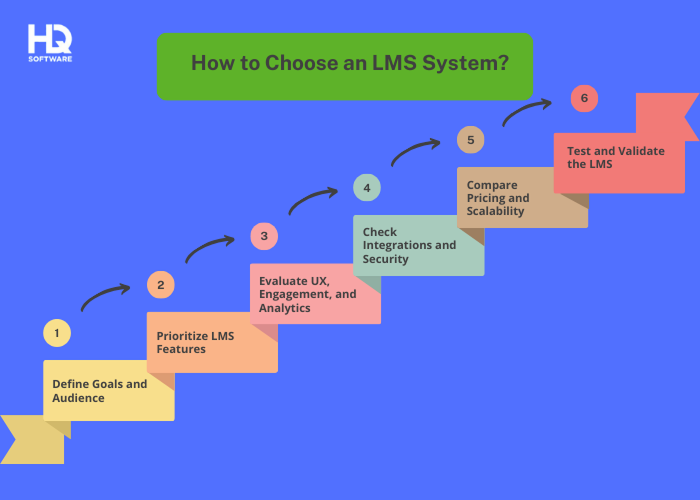
Before choosing an LMS, you need to know exactly what you want to achieve. Are you trying to train new hires, teach safety rules, or help your sales team improve? You also need to think about who will be using the system. For example, a team of tech experts might want different features than a group of busy delivery drivers.
It is easy to get overwhelmed by all the “shiny” tools available. Use your goals from Step 1 to make a list of what you truly need versus what is just “nice to have.” This prevents you from overpaying for a complex system full of features that your team will never actually use.
An effective LMS must be intuitive to encourage consistent use. Evaluate the user experience (UX) to ensure navigation is straightforward and consider engagement features such as points or badges to motivate learners. Additionally, the system should provide clear analytics to track progress and performance across your team.
Your LMS should not be a lonely island; it needs to connect with your other tools, like your email or HR software. This “integration” saves you from doing the same work twice. Make sure the system has strong security to keep your company’s private training data and employee information safe.
Look closely at the total cost, including any hidden fees for setup or support. Ensure the system is scalable, which means it can grow with your company. An LMS that works for 20 people today should be able to handle 200 people tomorrow without slowing down or crashing.
Never buy a system without trying it first. Ask the vendor for a free trial or a live demo and let some of your employees test it out. Their feedback will tell you if the LMS is actually useful in the real world, allowing you to feel confident that you are making the right investment.
While this guide provides a solid roadmap for selection, a sophisticated LMS often requires deeper technical expertise. Partnering with Hymux Technologies gives you access to a team of experts. We make sure your new system works perfectly with your current tools and business needs.
Choosing the right technology is the foundation of a successful training strategy. From building a custom platform to improving your current system, Hymux Technologies makes your vision work for your business.
Here is how we can help you achieve your learning goals:
While a custom approach offers maximum flexibility, it is useful to see how it compares to other popular LMS models on the market. Below, we provide a learning management system features comparison chart to highlight the distinctions between various types and help you visualize the best fit for your needs.

Struggling to integrate your LMS with existing tools and workflows?
Let Hymux Technologies seamlessly connect your LMS with your current systems to create a unified, efficient training ecosystem.
Dmitry Tihonovich
Business Development Manager
When comparing LMS options, start by asking a few simple questions: Who are we training? How will they access the content? What experience do we want to create? What does success look like? Your answers should guide you toward a system that fits your long-term goals, not just a list of features.
A cloud-based LMS is hosted on remote servers and accessed through the internet, eliminating the need for local installation or maintenance. Users can access learning materials from any internet-connected device, which makes this type of system exceptionally flexible.
The subscription model common to cloud-based solutions means lower upfront costs and guaranteed automatic updates and security patches. They’re ideal for organizations seeking scalability and the ability to quickly deploy training programs without investing in physical infrastructure.
Organizations can achieve complete control over data through installing an on-premise LMS on their own servers and computing infrastructure. However, significant upfront investment in hardware, software licenses, and dedicated IT staff becomes necessary for maintenance and updates.
While this approach offers maximum control and customization potential, it also demands ongoing technical resources and requires the organization to bear full responsibility for system security and performance.
An academic LMS is specifically designed for educational institutions such as schools, colleges, and universities to facilitate formal learning environments. These platforms typically include features that include:
Semester-based scheduling and multiple instructor roles are among the unique educational workflows these platforms are designed to handle. Academic LMS platforms offer comprehensive functionality, including attendance tracking, discussion forums, and academic assessment tools.
A corporate LMS is tailored to helping businesses train employees, partners, and customers on company-specific skills. Onboarding new hires represents a core function of these systems, which also deliver compliance training throughout the organization. Staff upskilling and certification tracking round out the primary capabilities.
Corporate LMS platforms typically feature robust reporting and analytics to measure training effectiveness and calculate ROI while monitoring employee performance. These systems integrate seamlessly with existing HR infrastructure and accommodate microlearning formats for flexible delivery.
A simplified LMS offers basic functionality designed for organizations with straightforward training needs and limited technical expertise. These platforms prioritize ease of use over advanced features, making them accessible to users without extensive technical knowledge.
Simplified LMS solutions typically include essential functions such as course uploading, basic tracking, simple assessments, and fundamental reporting capabilities. They’re perfect for small businesses, nonprofits, or teams that need to quickly deploy training without the complexity and cost of more comprehensive systems.
An enterprise LMS is a comprehensive platform designed to meet the complex training needs of large organizations with thousands of users across multiple departments and locations. These systems offer advanced features, including:
Enterprise LMS platforms provide centralized administration, allowing advanced security protocols and the ability to handle high volumes of concurrent users. They’re built to support diverse learning initiatives across an entire organization.
An extended enterprise LMS goes beyond training internal employees to educate external audiences such as customers, partners, distributors, supply chain members, etc. This platform lets organizations profit from training by selling courses, run separate white‑label versions for multiple groups, and monitor learning outcomes across those distinct units.
Extended enterprise LMS platforms feature eCommerce capabilities that support direct monetization of training content. Partner portals create dedicated spaces for external audiences, while channel training management maintains consistency across networks. Through these capabilities, companies can extend their brand influence and accelerate product adoption.
The LMS comparison chart below compares the different LMS types, highlighting their strengths and trade-offs to help you find the best fit.
Choosing the right LMS is a significant step for any organization, but it doesn’t have to be overwhelming. By focusing on the features that truly matter to your specific audience and business goals, rather than getting distracted by endless checklists, you can find a solution that adds real value. Whether you choose a standard off-the-shelf platform or decide that a custom-built system is the better fit, the goal is to empower your learners and streamline your training process.If you find that ready-made solutions can’t keep up with your unique requirements, a custom LMS might be the answer. Hymux Technologies is ready to help you design and build a platform that fits your workflow perfectly.
Contact us today to start a conversation about how we can help you transform your learning and development strategy.

Lead Software Engineer
An experienced developer with a passion for IoT. Having participated in more than 20 Internet of Things projects, shares tips and tricks on connected software development.


Subscribe for more!
We are open to seeing your business needs and determining the best solution. Complete this form, and receive a free personalized proposal from your dedicated manager.

Sergei Vardomatski
Founder